Showing posts with label Software. Show all posts

Wednesday, March 30, 2011

Bump for iPod

What's Bump?

Bump™ makes sharing with people as simple as bumping two phones together. Just pick what you want to send, then hold your phones and gently bump hands with another Bump user. And now, you can message with your friends who aren't near you -- just add them as a friend inside of Bump and start messaging immediately -- it's kind of like a long-distance "virtual bump".

Use Bump for free texting: send messages anytime, complete with instant push notifications.
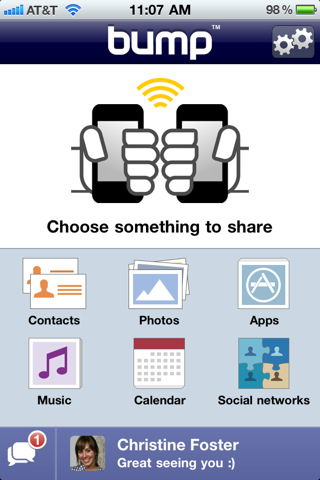
Share photos, apps, music, messages, locations, contacts, calendar events; become friends on Facebook, Twitter, and LinkedIn; compare mutual friends, and more.

Bump works cross-platform between iPhone, iPad, iPod, and many other phones.

What's new in version 2.4.1:
+ Landscape keyboard!
+ Delivery failure alert: know if your message doesn't get through
+ Faster scrolling

What's new since version 2.2:
+ App Sharing! Select your favorite apps and bump them to a friend. They'll get direct links to download the apps from iTunes.
+ Send messages to friends who aren't near you by adding them as a friend inside of Bump -- it's kind of like a long-distance "virtual bump".
+ Music Sharing! Select songs on your device and bump them to a friend. They can stream them for free from Youtube, listen to iTunes previews, or buy them on iTunes.

Source: iTunes.com

CarFinder for BB

Now here’s an app that would come in handy for a guy like me. Ever find yourself at that big sporting event, or perhaps you were doing some shopping at the mall, and for the life of you, you can’t remember where you parked your vehicle? This has happened to me more than once, and it usually ends up with a fit of historical laughter as I weave my way in and out of cars, hoping to find the one that brought me. Thankfully, the crafty developers at VisionQuest Innovations have put together a new BlackBerry app called VQ CarFinder.

All you need to get this working is a GPS-enabled BlackBerry running OS 4.5 or later… and Bluetooth built-in to your vehicle. If you don’t have Bluetooth in your vehicle, you can purchase a VQ Bluetooth Car Charger to help things along.

The great thing about this app is it is pretty darn automatic. When you start up your vehicle, Bluetooth automatically kicks in. The VQ CarFinder app picks up the signal and launches GPS to track your current location. When you turn your vehicle off, the Bluetooth signal stops, at which point the app pinpoints the last location of the Bluetooth signal. Now, to find your car, all you have to do is launch the VQ CarFinder app, and a handy map will show you where you are, and where your ride is. Easy!

You can pick up VQ CarFinder for $9.99 in App World. For more info hit up http://www.4carfinder.com/ from your desktop or BlackBerry handheld.

Note: There’s also a cool contest goin on over at 4carfinder.com. Tell them your parking horror story as a video and you could win a shiny new Berry.

By: James

Fruit Ninja! (for iPod/iPad)


What is Fruit Ninja?

Swipe your finger across the screen to deliciously slash and splatter fruit like a true ninja warrior. Be careful of bombs - they are explosive to touch and will put a swift end to your juicy adventure!

Fruit Ninja also uses OpenFeint, so players can unlock achievements and shoot for the top of the global leaderboards while racking up OpenFeint points.

Your success will also please the wise ninja Sensei, who will accompany your journey with wise words and fun fruit facts.

Fruit Ninja is the messiest and most satisfying fruit game ever!

Plant VS Zombies for Mac

Who knew zombies were omnivores? Plants vs. Zombies presents a cuddlier take on these murderous undead. They really want to eat your brains, but they shamble in a straight path to your house, snacking on landscaping that gets directly in their way. Thankfully, your garden fights back, with pea-shooting plants, exploding peppers, giant flytraps, and dozens more. You’ll plant these defenses to stop the zombies in a sly, simple game with compelling strategy.

Gamers will recognize that Plants vs. Zombies reshapes the “tower defense” genre, strategy games where you set up automated turrets to protect from assailants. But Plants vs. Zombies both simplifies that premise and adds a lot more depth, making it stand out in that current-fad genre.

You’ll buy new plants by harvesting sunlight icons that drift down from the sky or are generated by certain plants. At first, you’ll only have a choice of a few plants, and the same kind of zombie will keep attacking. But you’ll earn a new plant type at the end of nearly every level, and you’ll face a new zombie in the next round, eventually battling dozens. We had fun developing favorite strategies for various situations, such as using plants that freeze fast-moving zombies or positioning magnetized plants to pull off zombies’ protective bucket helmets.

Both the plants and zombies are lovingly presented, with sharp illustrations and sound effects. Some zombies wear traffic cones as helmets and are tougher to stop. Some run and pole-vault over the first item in their path. All are a joy to discover.

While the game’s premise stays the same, each zombie and level twists the situation. You’ll battle swimming zombies in a backyard pool, have your visibility hampered by fog, and even position plants in pots to protect your roof. Even the method of planting gets broken up; some levels skip the sun-collecting system and just shuffle plants along a conveyor belt. Other times, you’ll hit zombies with a mallet.

And the twists just keep coming. A virtual-pet minigame rewards you for tending sprouts daily. And puzzle-based levels take even more thought; we especially liked playing as the zombies and attacking the plants. These and many more variations keep the game engaging.
You'll smile at the clever Plants vs. Zombies animation and sound, but compelling strategy rules give it even deeper roots.


Plants vs. Zombies
COMPANY: PopCap Games
CONTACT: www.popcap.com
PRICE: $19.95
REQUIREMENTS: 1.66GHz Intel Core Duo or faster Intel processor, Mac OS 10.4.11 or later

Source: maclife.com

Tofu for Mac

Tofu is a novel application to address the common problem that people don't like reading text on the screen.


Why is that anyway? I believe there are two main reasons: line width and visual instability.

Text is usually very wide on the screen, which makes going from the end of one line to the beginning of the next difficult. That's why newspapers have narrow columns: It makes them faster to read.

So why not just take a normal window and make it narrower, scrolling down as you need? Well, there are usually a lot of lines in a text, and all look more or less the same, so if they move past your eyes vertically, they are difficult to keep track of. The text doesn't feel stable, and you get lost easily.

In Tofu, text is arranged in columns, and each column is only as high as your window. So lines are nice and narrow, and they don't move about vertically. You just scroll from column to column horizontally, and feel more in control. Bonus: your text is now also in easy-to-digest chunks.

Tofu also includes some other useful features to make reading easier. To search for a word, simply start typing it; Tofu will find to the next matching instance as you type. There's a system-wide Service, so you can quickly move some text from a web page into Tofu. And it lets you navigate using your voice, so you can literally sit back and read.